Unifi USG-Pro-4's USB Port
I recently got my hands on an old USG-Pro-4 firewall (which I would not recommend, I mean it is a Gen1 device so out of support now - these have a very slow boot time and this firewall specifically has its fans hard-wired to 100%.
In the hardware overview for this firewall a USB port is listed:
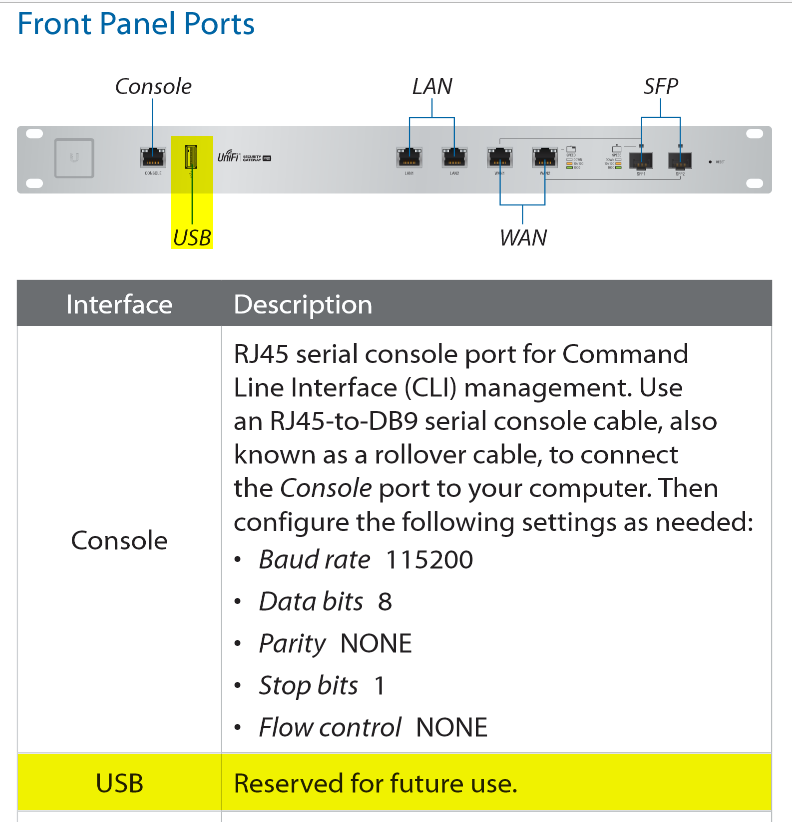
This is however listed for "future use" and from what I can tell has never had this future use, users on the Ubiquiti forum have suggested using it for powering a CloudKey / that it is used for device recovery only (although I couldn't find this noted anywhere either).
Checking if the port is even accessible
First, we will need to get SSH access (and later root access). Luckily this is already accessible for the USG-Pro-4, but UniFi devices are well known for having many different default passwords.
If you have already adopted the firewall, you can SSH into it with the credentials listed in UniFi Devices -> Device Updates and Settings -> Device Settings -> Device SSH Authentication on your controller dashboard (subject to change, especially on UniFi).
If your firewall is not already adopted, plug into the LAN1 (not LAN2) ethernet port and SSH to 192.168.1.1 with the credentials ubnt:ubnt.
From here you can simply run sudo su and be dropped into a (very limited) root shell.
If you plug in a USB mass storage device (there are no other USB drivers on the firewall, as seen with find /lib/modules/ | grep usb) you can see that it is actually detected in dmesg!
usb 1-1: new high-speed USB device number 5 using octeon-ehciThat's... it? As it turns out, whatever Linux kernel they are running does not automatically load modules as needed.
Actually mounting the USB device
To actually load the USB mass storage driver, you can use modprobe usb-storage (make sure you are root).
This will yield the following dmesg log:
SCSI subsystem initialized
usb-storage 1-1:1.0: USB Mass Storage device detected
scsi0 : usb-storage 1-1:1.0
usbcore: registered new interface driver usb-storage
scsi 0:0:0:0: Direct-Access     Kingston DataTraveler 3.0 PMAP PQ: 0 ANSI: 6
Despite this Linux still doesn't decide to load the scsi driver properly, so we need to modprobe sd_mod, which gives us:
sd 0:0:0:0: [sdX] 242417664 512-byte logical blocks: (124 GB/115 GiB)
sd 0:0:0:0: [sdX] Write Protect is off
sd 0:0:0:0: [sdX] Mode Sense: 45 00 00 00
sd 0:0:0:0: [sdX] Write cache: disabled, read cache: enabled, doesn't support DPO or FUA
 sdX: sdX1 sdX2
sd 0:0:0:0: [sdX] Attached SCSI removable disk
Success? Yes! We can now see the disk in lsblk (ignore the size change, I didn't want to format a 128GB USB):
sdX 8:0 1 7.5G 0 diskDue to the ancient firmware running on these firewalls, we need to partition it as ext2 or ext3 (not even ext4 is supported), you can do this externally or if you prefer they have thankfully included cfdisk to make the partition, then you'll need to format it with mkfs -t ext3 /dev/sdX.
Mounting the drive is as easy as mount /dev/sdX /mnt and it just works!
Making the mount persistent
vi is included with the default firmware and so is a way to run scripts on boot, so we can create a startup script using vi /config/scripts/post-config.d/mount-usb.sh.
I populated this with a script to mount the USB device on boot:
#!/bin/vbash

# Give the system a moment to settle after boot
sleep 15

# Load the USB storage module
modprobe usb-storage
sleep 5

# Load the SCSI disk module
modprobe sd_mod
sleep 5

# Create a mountpoint (as to not mount to /mnt directly)
mkdir -p /mnt/usb_storage

# Mount the drive
mount /dev/sda1 /mnt/usb_storage
You would then make a network share (but I haven't tested this yet), however note that there is no package manager installed and the CPU architecture is just weird (and ancient, who uses MIPS??), so it will be a challenge to even run a share:
ubnt:~$ cat /proc/cpuinfo
system type             : UBNT_E220
machine                 : Unknown
processor               : 0
cpu model               : Cavium Octeon II V0.1
BogoMIPS                : 2000.00
wait instruction        : yes
microsecond timers      : yes
tlb_entries             : 128
extra interrupt vector  : yes
hardware watchpoint     : yes, count: 2, address/irw mask: [0x0ffc, 0x0ffb]
isa                     : mips1 mips2 mips3 mips4 mips5 mips64r2
ASEs implemented        :
shadow register sets    : 1
kscratch registers      : 3
core                    : 0
VCED exceptions         : not available
VCEI exceptions         : not available